Carvalho's SpriteWalkMenu Plugin for RPG Maker MV
A downloadable tool
Carvalho's SpriteWalkMenu Plugin for RPG Maker MV
🔗 Get it now on itch.io: https://carvalhopluginsrpgmakermv.itch.io/carvalho-spritewalkmenu
🌐 All Links / Contact: https://linktr.ee/lucasfira
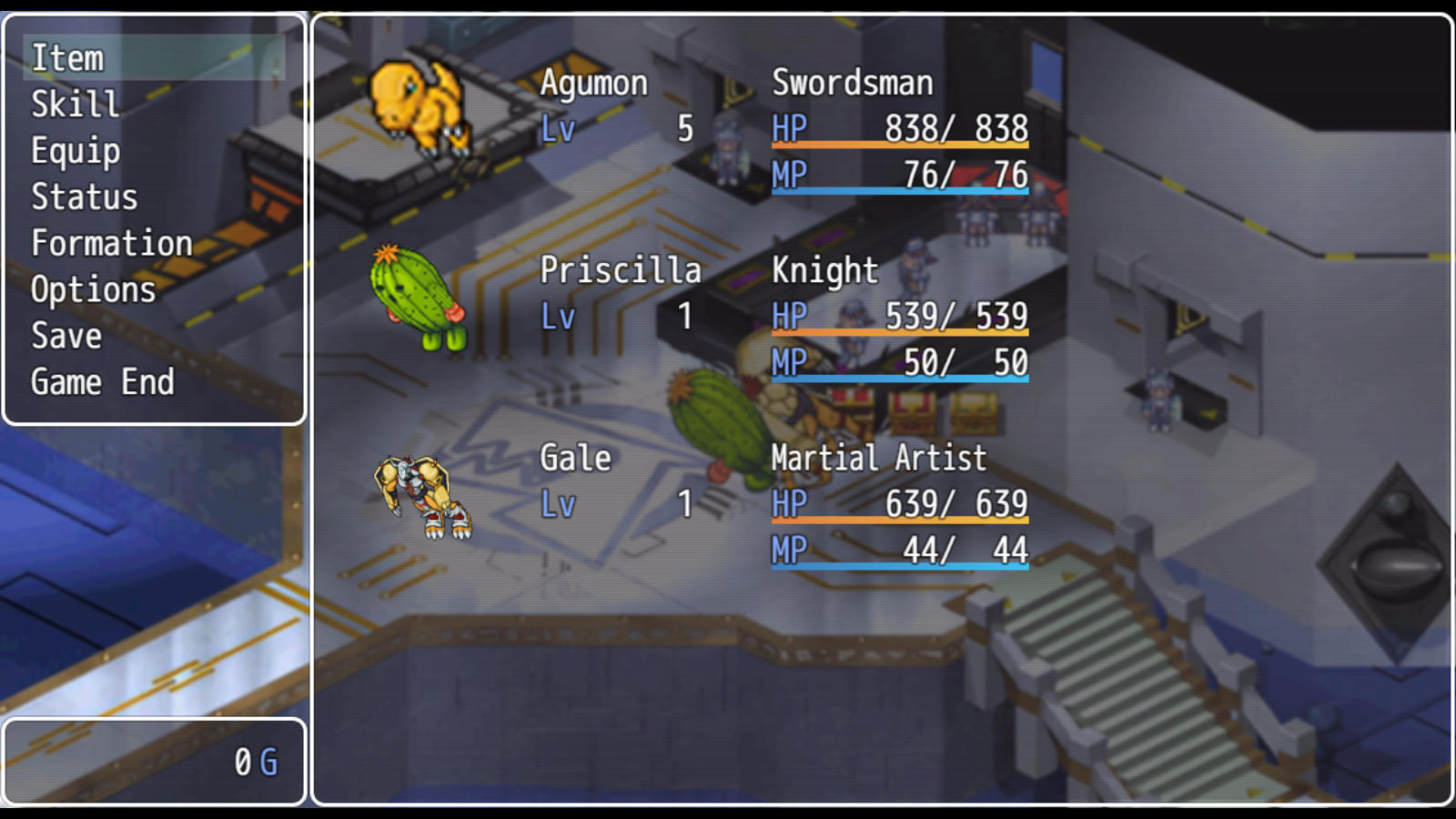
🧙♂️ Carvalho's SpriteWalkMenu Plugin for RPG Maker MV 🧙♂️ Transform your RPG Maker MV game menus with Carvalho's SpriteWalkMenu Plugin! This plugin replaces static character face images with dynamic, down-walking sprite animations, creating a lively, breathing-like effect in Status, Skills, Battle, and Party menus. Using sprites directly from your RPG Maker MV database, it requires no extra setup, making it perfect for developers who want to enhance their game’s visual flair effortlessly.
✨ Bring your characters to life with animated sprites in every menu!
🌀 Carvalho_SpriteWalkMenu Plugin v3.8
🎮 Replaces face images with character sprite animations for a dynamic menu experience. 🎭 Uses down-walking sprites (3-frame cycle) from your RPG Maker MV database. 🔧 Fully customizable positioning and scaling for seamless integration.
🔧 Key Features – Carvalho_SpriteWalkMenu:
🎭 Animated Character Sprites: Displays down-walking sprite animations (3 frames) in place of static face images for a vibrant, breathing-like effect. 🚀 Zero Configuration: Automatically pulls character sprites from the RPG Maker MV database—no manual sprite setup required. 📏 Customizable Positioning: Fine-tune sprite placement with global and specific X/Y offsets for Status, Skill, and Party windows. 🔍 Scalable Sprites: Adjust sprite size with a global scale parameter (default: 60% for optimal visuals). 🧩 Toggleable Options: Enable or disable animations for Status, Skill, and Menu/Party windows via plugin parameters. 💬 Message Window Compatibility: Retains original face images in message windows for narrative consistency. 🎮 Broad Menu Support: Works in Menu, Status, Battle, and Skill scenes in RPG Maker MV (v1.6.1). 📦 Big Sprite Support: Compatible with standard and large ($-prefixed) character sprite sheets. ⚡ Optimized Performance: Lightweight and designed to avoid conflicts with other plugins.
🧰 How to Install:
- Download Carvalho_SpriteWalkMenu.js from itch.io.
- Place the file in your project’s js/plugins folder.
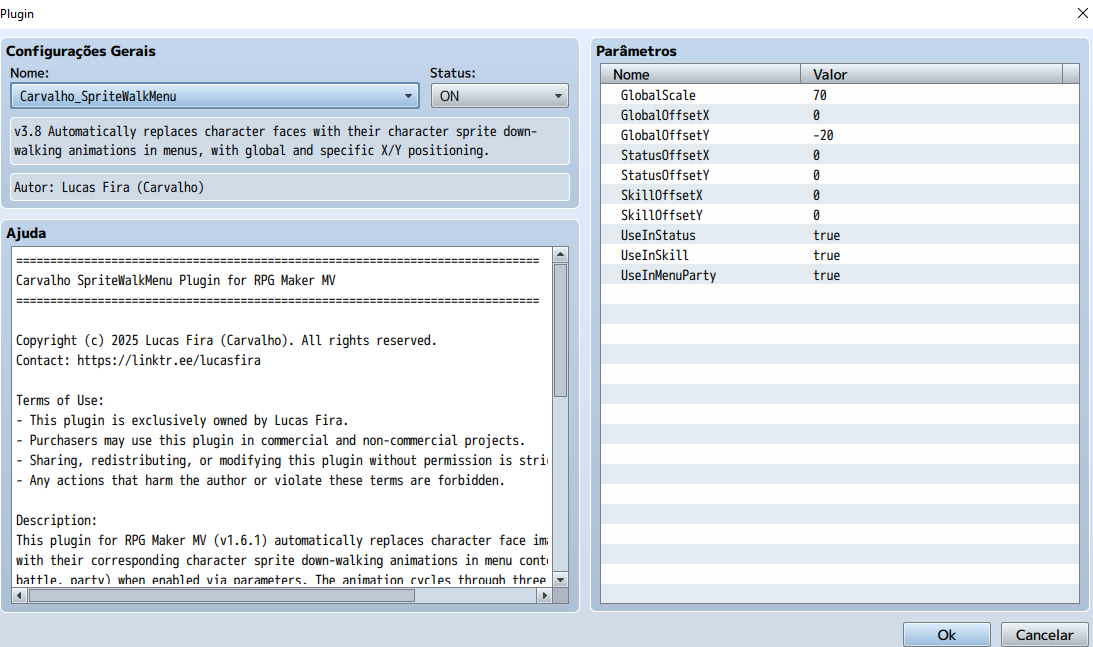
- Enable the plugin in RPG Maker MV’s Plugin Manager.
- Adjust parameters like GlobalScale (default: 60), GlobalOffsetX (default: 0), and GlobalOffsetY (default: -20) to fit your game’s style.
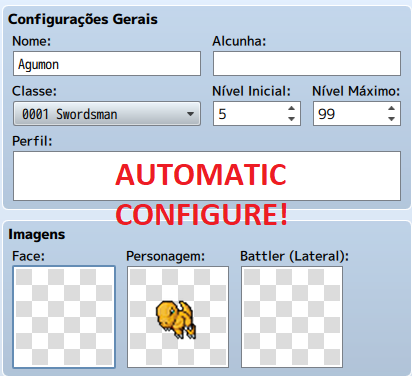
- Ensure your actors have character sprites assigned in the RPG Maker MV database.
- Test in-game to see animated sprites in action!
📌 No external libraries or additional assets required—uses your existing character sprites!
📝 License:
✅ Free for commercial and non-commercial use (for verified buyers). ✏️ You may edit the code for personal use. 🚫 Redistribution, resale, or sharing without permission is prohibited. ❗ No sprite assets included—you must use your own character sprites.
🔒 Copyright © 2025 Lucas Fira (Carvalho)
💡 Create immersive, animated menus that make your characters feel alive! Enhance your RPG Maker MV project with dynamic sprite animations, offering players a visually engaging experience as they navigate menus and strategize.
👉 Download now: https://carvalhopluginsrpgmakermv.itch.io/carvalho-spritewalkmenu
📢 Subscribe for more RPG Maker plugins, dev tools, and tutorials! 🔔 Like & Share to support Carvalho Plugins and help other developers discover this game-enhancing feature!
🔍 Tags: RPGMakerMV,CarvalhoPlugins,SpriteAnimation,MenuEnhancement,CharacterSprites,RPGMakerPlugin,AnimatedMenus,GameDevTools,RPGVisuals,MenuCustomization,SpriteWalkMenu,RPGMakerAddons,GameMechanics,CustomUI,JavaScriptPlugin,RPGMakerTools,MenuAnimation,RPGDevelopment,VisualEffects,DynamicMenus,PluginMV,RPGInterface,GameDevPlugin,RPGMakerScripting,CharacterAnimation,UIPlugin,GameDesign,RPGMakerMVPlugins,AnimatedSprites,MenuSystemMV,CustomScene
Purchase
In order to download this tool you must purchase it at or above the minimum price of $3 USD. You will get access to the following files:
Leave a comment
Log in with itch.io to leave a comment.